Thursday, April 28, 2011
Tuesday, April 19, 2011
How to Check the Hard Drive on a Mac


 Related Posts:
Hardware,
Mac,
safe mode,
Slow Startup,
Startup problems
Related Posts:
Hardware,
Mac,
safe mode,
Slow Startup,
Startup problems
Sunday, April 10, 2011
Duplicate Contacts Calendars with MobileMe iPhone

I signed up for Mac MobileMe after it was first released and I am hooked. I love being able to sync photos, contacts, and calendars in the cloud. Everything is automatically 'pushed' to your devices to keep your constantly changing information in sync. Add a new contact and there it is, already in sync on all of your Mac devices and in Outlook on your PC. I love not
Sunday, April 3, 2011
Application Freeze on a Mac
You are pushed for time and are trying to get some work done, when your cursor turns into the spinning beach ball that you despise! You sit and wait precious seconds for the beach ball to go away. You move your cursor away from the application. The beach ball disappears, only to reappear when you move it back. Your computer is frozen. How can you
Related Posts:
Mac
Sunday, March 27, 2011
ZoomIT - SysInternals Zoom and Annotations Utility
 Related Posts:
Sysinternals
Related Posts:
Sysinternals
Monday, March 21, 2011
The Case of the Unexplained 2010 SysInternals Review
 Image by rwoan via Flickr
The Case of the Unexplained is an ongoing series of webcasts, by Mark Russinovich, based on real troubleshooting scenarios in Windows. Mark Russinovich is a Technical Fellow at Microsoft, which is the highest technical position at Microsoft. A Senior Architect in the Windows division, Mark was the co-founder and chief software architect of Winternals Software, co-author of Windows Internals 4th and 5th edition and Inside Windows 2000 3rd edition with
Related Posts:
File Signature Verification,
Slow Startup,
Startup problems,
Sysinternals
Friday, March 11, 2011
Sysinternals Advanced Malware Cleaning Review
Image by rwoan via FlickrTrying to cleanup malware from your computer? Advanced Malware Cleaning, located on the Windows Sysinternals website, is a must watch video from Windows expert Mark Russinovich. Mark was the co-founder of Sysinternals before it was acquired by Microsoft in 2006.
Mark gives an overview of how SysInternals tools work, such as Process Explorer, along with using the AutoRuns utility, SigCheck, and TCPView Utility to discover where malware is hiding on your computer and how to clean it. Mark talks about Rootkits and his own RootkitRevealer tool, an advanced rootkit detection utility.
Mark discusses the future of malware and how malware is becoming harder and harder to detect.
Related Posts:
command line,
Drivers,
File Signature Verification,
freeware,
msconfig,
Register,
Slow Startup,
Startup problems,
Sysinternals,
Task Manager,
TCPIP
Thursday, March 3, 2011
Iphone4 Crash
Tweet


When you open an app on the iphone, it leaves the application open so you don't have to reopen it the next time you want to use it. This is a benefit of multitasking, one of the features of iOS4.
If too many apps are open, your iphone could suddenly shut down. You might also notice your battery draining faster than it used to. The more apps open on your iphone, the faster the battery drains.
Related Posts:
Iphone
Sunday, February 27, 2011
Windows Hang and Crash Dump Analysis Webcast Review
Recently, I spent an exciting Saturday watching and documenting a Sysinternal's webcast by Windows expert, Mark Russinovich, entitled, Windows Hang and Crash Dump Analysis. Mark takes you step by step into the internals of Windows to help you better understand how system crashes happen, what caused the crash, and how to fix it.
These are my notes I took during the Webcast. On a separate afternoon, while writing this blog, I tested WinDbg. Included in this documentation, are additional notes about what I did to create a crash dump, using the program Mark wrote called NotMyFault, and how I tested WinDbg. I am hoping the hours I spent watching and documenting the webcast will be useful one day to me and to my blog readers. The entire process has been a learning experience and very gratifying.
And now, the Webcast....
These are my notes I took during the Webcast. On a separate afternoon, while writing this blog, I tested WinDbg. Included in this documentation, are additional notes about what I did to create a crash dump, using the program Mark wrote called NotMyFault, and how I tested WinDbg. I am hoping the hours I spent watching and documenting the webcast will be useful one day to me and to my blog readers. The entire process has been a learning experience and very gratifying.
And now, the Webcast....
Related Posts:
Drivers,
Shutdown Problems,
Slow Startup,
Startup problems,
Sysinternals
Wednesday, February 23, 2011
How to run Windows Memory Diagnostics Tool
 Image via Wikipedia
You are having various application problems on your computer. You think the computer's RAM might be failing and you want to check it using the Windows Vista Memory Diagnostics tools.
How do you run the Windows Vista Memory Diagnostics tools?
Related Posts:
command line,
Memory,
Vista
Monday, February 21, 2011
Computer Lost Internet Connection
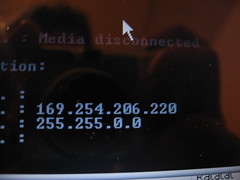
Most home computers connect to the Internet through a Dynamic Host Configuration Protocol (DHCP) server. This means the IP address is automatically assigned by the server (most likely your router). IP addresses are automatically assigned (leased) for a time determined by your ISP. The time varies, depending on the ISP. When your lease expires you lose your internet connection.
Related Posts:
command line,
Network,
TCPIP,
wireless
Sunday, February 20, 2011
Network Problems because your Wireless Switch is turned off
Many mobile laptops have a wireless switch on the front or side of the computer to enable or disable the wireless radio. This functionality is usually added to allow laptop usage on an airplane or in other areas with radio sensitive environments. You can switch off the wireless radio to enable usage of the laptop. It could be an actual hardware switch or a led light by the keyboard triggered by a combination of keystrokes such as Fn, Ctrl, Alt in combination with function keys ranging from F1 to F12. If you have a switch, make sure it is turned on in order to receive a wireless connection.
If you don't know how to turn on or off your laptop's wireless radio, consult the laptop manufacturer, or check the link below for a list of various laptop models and their corresponding wireless radio switches.
How to turn on/off Wireless in various Laptop Models


If you don't know how to turn on or off your laptop's wireless radio, consult the laptop manufacturer, or check the link below for a list of various laptop models and their corresponding wireless radio switches.
How to turn on/off Wireless in various Laptop Models
Friday, February 18, 2011
Problems with your DVD-ROM CD-ROM drives

Run the DRIVERQUERY command-line tool.
- Open a command prompt window.
- Type driverquery /? (to get a list of the driverquery options)
- Type driverquery | more (to see a pageview display of drivers). note: the | sign on the keyboard is the broken line above the \
 Related Posts:
command line,
Drivers
Related Posts:
command line,
Drivers
Wireless enabled and no internet connection

I googled "wireless connection showing enabled and no Internet", as I had never before encountered that problem. A blog entitled, Repair and reset Windows Vista TCPIP Winsock Catalog Corruption popped up and described the situation. It was easy and solved the problem in five short steps. Be sure to click on the link for an explanation as to what caused the Winsock corruption. This fix could save you a lot of potential headache. Here is the Microsoft Knowledge Base article for How to determine and to recover from Winsock2 corruption in Windows Server 2003, in Windows XP, and in Windows Vista.
Related Posts:
command line,
Firewall,
Internet Explorer,
TCPIP,
virus
Tuesday, February 15, 2011
Find IP address of Network Printer
 Image via Wikipedia
If there is a computer set up to use the printer:
- Go to Start
- Go to Control Panel (In Vista, type Printer in the search box on the Start menu)
- Go to Printers and Faxes
- Right click the printer
- Click Properties
- Click the Ports tab to display the IP address
You can ping your network from a computer connected to the network and look up an arp table:
- Click Start
- Click cmd
- Type ipconfig to find your network address. Most of the time it will be 192.168.1.1 (the default gateway) on a home network.
- Ping your network using the broadcast address. If your network address is 192.168.1.1, the broadcast address is 192.168.1.255 and you would ping 192.168.1.255. If your network address is 192.168.2.1, the broadcast address is 192.168.2.255 and you would ping 192.168.2.255.
- Then type arp -a to see the devices connected to the network. One of the listed devices is the printer.
 Related Posts:
command line,
Network,
Printer,
Vista,
Windows XP
Related Posts:
command line,
Network,
Printer,
Vista,
Windows XP
Subscribe to:
Posts (Atom)