Showing posts with label Internet Options. Show all posts

Wednesday, November 17, 2010

XML error message for RSS Feed

This icon, known as the "feed icon" ...Image via Wikipedia

When trying to view your RSS Feed in Internet Explorer, you receive an error message like this:


What do you do to resolve this?

  1. Open Internet Explorer
  2. Click on Internet Options
  3. Select the Content tab
  4. Open the Feeds Settings dialog box
  5. Go to Advanced and check the Turn on Feed Reading View box

This displays the feed in user-friendly content.
Enhanced by Zemanta

Prevent Tracking in Internet Explorer


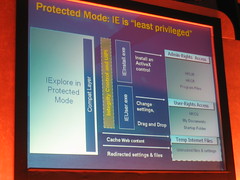
Internet Explorer 7 with Windows Vista runs in Protected Mode which prevents Component Object Model (COM) objects such as ActiveX controls, from modifying files and settings on your computer, thus making surfing the Web much safer.  Protected Mode is enabled by default in IE7. 

To turn off Protected Mode, though it is not advisable, go to Internet Options, select the Security Tab, then select the Enable Protected Mode option.


Another way to manipulate the Protected Mode option, is to put your cursor over the Protected Mode text at the bottom of your Internet Explorer browser window and double click.


Enhanced by Zemanta

Monday, November 15, 2010

Remove Internet Explorer ActiveX Controls or Add-ons


You only want ActiveX Controls or Add-ons that are approved by Microsoft or your computer manufacturer.  How do you do manage this?

Open Internet Explorer.
Go to Tools.
Select Manage Add-ons.
In the Show list, Click Add-ons that run without permission.

Internet Explorer add-ons: frequently asked questions
Enhanced by Zemanta

Friday, October 29, 2010

Internet Explorer problems

Block diagram describing the architecture of I...Image via Wikipedia
You are having problems with Internet Explorer. When you visit a website, old pages seem to appear. At first, you thought the websites were not being updated, but then you checked the websites on another computer, and saw that the pages were different. What should you do to correct the problem?

On the General tab of Internet Options, in the Temporary Files section, click on the Settings tab. Four options are available to set for Internet Explorer to check for new web pages: Every visit to the page, Everytime you start Internet Explorer, Automatically, Never. It is likely you had the selection set to Never.
Enhanced by Zemanta

Tuesday, October 26, 2010

Cookies

Block diagram describing the architecture of I...Image via Wikipedia

You are having problems using a bill payment Web application provided by your bank. Your computer runs MS Windows XP Pro with Internet Explorer. When you click on a link on the bank’s Web site, a message is presented indicating that cookies are not enabled. When you visit the link directly, this problem does not occur. What should you do?

Configure Internet Explorer to allow third party cookies.


Enhanced by Zemanta

Monday, October 25, 2010

ActiveX Controls

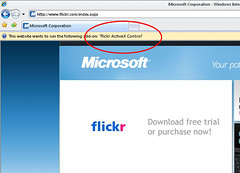
flickr's new activex controlImage by sebestyenistvan via Flickr

The claims representatives in your company access a corporate Web site and and update customer claims. The Web site uses several unsigned ActiveX controls to enhance user experience. The Web server is located behind a firewall. A claims representative cannot use the site because he is unable to download ActiveX controls. No other users are experiencing the problem.

The Local Intranet zone should be configured to allow unsigned ActiveX controls to be downloaded and run. By default, the Local Intranet zone in configured to disable the downloading and running of unsigned ActiveX controls.


Enhanced by Zemanta

Friday, October 22, 2010

Internet Zones and pop-ups

Dozens of pop-up ads covering a desktop.Image via Wikipedia

After Service Pack 2, what internet zones allow pop-ups by default?

Trusted sites
Local Intranet sites (Restricted and Internet sites will have pop-ups blocked by default)

Change Internet Explorer Security settings
Enhanced by Zemanta

Wednesday, October 20, 2010

Printing a Web page

A modern web browser and web page.Image via Wikipedia

You print a Web page, but the background images do not print.  You want to print the Web site as it appears in the browser.  What should you do?

Answer:  By default, backgound colors and images of Web pages are not printed.  To print them,you need to enable the print background colors and images setting on the Advanced tab of the Internet Options dialog box.

Enhanced by Zemanta

Sunday, February 14, 2010

Parental Controls in Vista


You need to restrict your son from playing unrated games on the computer for anyone that is 10+ or higher in age.  How do you do this?

Under Game Restrictions, select the Block Games with No Rating option.  Also, select the Everyone option.  The Everyone option allows games rated "E" for Everyone and "EC" for Early Childhood to be played.

Windows Vista Parental Controls
Enhanced by Zemanta