Wednesday, January 19, 2011

Unable to print to a network printer

Cutaway drawing, illustration of an inkjet printerImage via Wikipedia
Three users share a Windows XP desktop computer. An inkjet is connected locally to the desktop computer. The desktop computer also connects to several laser printers over the network.
One of the users complains he cannot print to the local inkjet printer. Both of the other users are able to print to it.

What should the user do?


Answer: Install the printer while the user is logged in. When a printer is installed on a Windows XP computer that is in a workgroup or domain, the printer may need to be installed separately for each user.


Install a printer on a home network


Enhanced by Zemanta

Tuesday, January 11, 2011

Understanding Task Manager in Vista


Task Manager is built into Windows to view and manage running application programs and processes.  You can use Task Manager to end programs and monitor performance.

You can choose how to view Task Manager by selecting the Options menu in Task Manager.  There are three ways to view Task Manager:

Add New Hardware

External hard disk enclosure from behind. On t...Image via Wikipedia

  1. Today a customer brings you his computer and external hard drive.  He claims the hard drive does not work. His computer runs Windows XP Professional. After examining the hard drive manual, you discover it is not Plug and Play. The customer has the disc containing the driver files. The computer is turned on but the external drive is not connected. What steps do you take to install the hard drive so the operating system can see it?
  • Connect the external drive to the computer.
  • Turn on the computer.
  • Open Control Panel/Printers and Other Hardware
  • Click Add Hardware link.
  • Choose Add New Hardware device from the list.
  • Choose Yes I have already connected the hardware option.
  • Choose the option to select the hardware from a list.
  • Choose the hard drive from the list of common hardware types.
  • Specify the location on the disc that contains the driver files.
Enhanced by Zemanta

Monday, January 10, 2011

How to get XP Printer Drivers to work in VISTA


Go to the Windows Compatibility Center and determine what will work with Windows Vista and if there is an upgrade.  The site is user friendly and assists you with any compatibility questions you have and guides you on the appropriate path for upgrading your software and/or hardware.
Enhanced by Zemanta

Sunday, January 9, 2011

Old AOL Versions

I recently set up a customer's new desktop computer.  The desktop came with Windows 7 and the new Internet Explorer 8 browser.  The customer was not interested in using Windows Mail because she preferred AOL.  It has been years since I have even looked at AOL.  After setting up the AOL email, the customer complained she did not like the newer version, and wanted to go back to the old version she was using on her old XP desktop.

I explained to the customer that for security reasons, it was not really a good policy to return to old software versions of any kind.  Software is not only upgraded for design purposes, but many times programming problems are corrected as well as improved security, especially in email related programs like AOL.

There was no convincing the customer.  She did not want to learn a new way of handling her email application. 

I proceeded to search the AOL site for instructions on how to return to the earlier version of AOL.  AOL confirmed my suspicions that the old versions are not supported.  I relayed this information, but my customer was unrelenting.  After searching Google for awhile, I was able to find a site containing old versions of AOL for those people unwilling to change.  If you know someone that fits in that category, check out this link for your version, because "newer is not always better".


OldVersion.com because newer is not always better
Enhanced by Zemanta

Thursday, January 6, 2011

Laptop shuts down intermittently

My daughter's friend, Lily, brings her laptop to me with a complaint that the computer shuts down intermittently.  After investigating, I determine there is no fan sound coming from the laptop.  The fan has apparently quit working, causing the laptop to shut down when it over heats.  However, Lily does not want to spend the money to purchase a new fan. 

It occurred to me, that while browsing in the computer section of Staples once (one of my favorite pastimes), I saw a laptop desk tray with a fan built into it to keep the laptop from overheating, since laptops have a tendency to overheat while sitting on top of your lap.  At the time, I thought it was a gimmick that no one would ever spend the extra money on.  I quickly took a spin down to Staples and purchased one.  And, would you believe it?  It solved the problem of Lily's laptop shutting down. 

I tested by removing the laptop tray and within one minute, the laptop shut down.  I did this several times to confirm.  As long as the laptop sat on top of the laptop tray and the fan was plugged in, the computer stayed operational!  I instructed Lily to leave the fan on when she uses the laptop.  This was about six months ago.  I just spoke to her last night, and her laptop is still running fine!
Enhanced by Zemanta

How to Add Google Voice Widget to Your Website

This is an extremely cool widget you can add to your website or blog!

Google Voice

Features of Google Voice

How to Add Google Voice Widget to Your Website

Enhanced by Zemanta

NTFS Permissions when deleting folders

Figure 1: Windows Explorer's folder view in Wi...Image via Wikipedia

What is the least permission that a user should grant others that would allow them to delete folders within a share?

Modify.
Enhanced by Zemanta

Wednesday, January 5, 2011

Volume Shadow Copy

Windows Shadow CopyImage by Bruce Elgort via Flickr

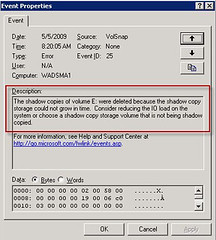
What situation would the IT Department use a volume shadow copy, instead of a backup strategy?

If the user accidentally overwrites a presentation he spent all day creating. Note that shadow copies maintain a maximum of 64 copies of a file. The copy schedule affects the amount of time that the oldest copies are deleted. Microsoft recommends writing shadow copies to a different volume on a different drive than the shared folders.

You should not write shadow copies to compressed volumes. Compressed volumes cannot have an allocation unit size of greater than 4 KB. Using a volume with an allocation unit size of less than 16 KB can result in loss of shadow copies.
How Volume Shadow Copy Service Works

Enhanced by Zemanta

Map a network drive

The architecture of the Next Generation TCP/IP...Image via Wikipedia

How would you list a shared network folder location in My computer for quick access?

Map a network drive to the shared folder.

Map a Network Drive in Windows Vista and Windows Server 2008
Enhanced by Zemanta

Tuesday, January 4, 2011

Folder Redirection

This is a diagram of a server-based computer n...Image via Wikipedia


  1. A manager would like to have user folders (like My Documents and My Pictures) automatically backed up by network administrators. What does this manager need?
Folder Redirection allows user data to be backed up to an alternate location, like a network server, normally using group policy.

http://technet.microsoft.com/en-us/library/cc778976(WS.10).aspx

Enhanced by Zemanta

How can you print a printer self test page?


How can you print a printer self test page?


Answer: Through the operator panel on the printer, or, through the printer properties settings.

Related articles
Enhanced by Zemanta

Monday, January 3, 2011

How to remove an external USB hard drive

What is the BEST way to explain to a user how to move an external USB hard drive to another computer?

Dismount the drive by right-clicking the device icon in the system tray. When the system displays that it is safe to remove the drive, unplug the device from the computer and plug it into the other computer.
Enhanced by Zemanta

Sunday, January 2, 2011

Hibernation

Laptop computers are portable and can be used ...Image via Wikipedia

You need to configure your desktop computer to maximize the time between recharging your computer that is used infrequently during the day. What mode should you use?


Hibernation is a feature of laptops that allow them to enter into a low power state. This low power state will ensure that the laptop battery is not consumed when it is sitting idle. Hibernation can be configured through the Power Options applet in the Control Panel.

Related articles
Enhanced by Zemanta

Thursday, December 23, 2010

How to create address labels using Open Office Mail Merge

OpenOffice.org Calc 3.0.0 on Ubuntu 8.10Image via Wikipedia


First, go to Open Office and download your free productivity suite.

In the past, I addressed all my Christmas labels by hand.  What a pain.  After spending way too much time on doing THAT this year, I finally figured out how to do a Mail Merge to create address labels using Open Office.  The reason for using Open Office is, it is free, as I do not have Microsoft Office on my laptop and I hate to pay for something I can get free.  If you are used to Microsoft Office Mail Merge, you might have some difficulty, but follow my instructions for using Open Office, as I have condensed the instructions into an easy to understand format, I hope.

If you have any confusion, use the Open Office docu Using Mail Merge to follow along with my instructions.  Both documents together might clear up any questions you have.  After you have downloaded Open Office and saved it to your desktop: