My daughter's friend, Lily, brings her laptop to me with a complaint that the computer shuts down intermittently. After investigating, I determine there is no fan sound coming from the laptop. The fan has apparently quit working, causing the laptop to shut down when it over heats. However, Lily does not want to spend the money to purchase a new fan.
It occurred to me, that while browsing in the computer section of Staples once (one of my favorite pastimes), I saw a laptop desk tray with a fan built into it to keep the laptop from overheating, since laptops have a tendency to overheat while sitting on top of your lap. At the time, I thought it was a gimmick that no one would ever spend the extra money on. I quickly took a spin down to Staples and purchased one. And, would you believe it? It solved the problem of Lily's laptop shutting down.
I tested by removing the laptop tray and within one minute, the laptop shut down. I did this several times to confirm. As long as the laptop sat on top of the laptop tray and the fan was plugged in, the computer stayed operational! I instructed Lily to leave the fan on when she uses the laptop. This was about six months ago. I just spoke to her last night, and her laptop is still running fine!
Thursday, January 6, 2011
How to Add Google Voice Widget to Your Website
This is an extremely cool widget you can add to your website or blog!
Google Voice
Features of Google Voice
How to Add Google Voice Widget to Your Website
Google Voice
Features of Google Voice
How to Add Google Voice Widget to Your Website
Related articles
- What's the Best Android Calendar Widget? (brighthub.com)
- Google Revamps Android Hotpot App (searchenginejournal.com)
- First Look at Android 3.0 Honeycomb, or Android for Tablets [Video] (lifehacker.com)
- Use a Google Voice Number from Outside the U.S. [International] (lifehacker.com)
- The Electric Educator: 10 Google Voice Tricks That Will Rock Your Phone! (electriceducator.blogspot.com)
- New Widgets Let Any Website Offer Local Shopping Options (mashable.com)
NTFS Permissions when deleting folders
Image via WikipediaWhat is the least permission that a user should grant others that would allow them to delete folders within a share?
Modify.
Related articles
- Folder Permission on server 2008 R2 (edugeek.net)
- How Can I Share Folders In Windows 7? (lockergnome.com)
- Scripting to Delete multiple files and folders. (edugeek.net)
- How can I automatically delete contents of Recycler folder? (edugeek.net)
Wednesday, January 5, 2011
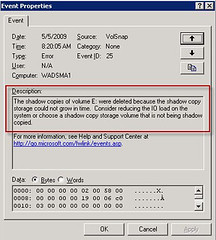
Volume Shadow Copy
Image by Bruce Elgort via FlickrWhat situation would the IT Department use a volume shadow copy, instead of a backup strategy?
If the user accidentally overwrites a presentation he spent all day creating. Note that shadow copies maintain a maximum of 64 copies of a file. The copy schedule affects the amount of time that the oldest copies are deleted. Microsoft recommends writing shadow copies to a different volume on a different drive than the shared folders.
You should not write shadow copies to compressed volumes. Compressed volumes cannot have an allocation unit size of greater than 4 KB. Using a volume with an allocation unit size of less than 16 KB can result in loss of shadow copies.
How Volume Shadow Copy Service Works
Related articles
- What To Do About Missing Windows 7 Restore Points (itexpertvoice.com)
- ShadowExplorer Updated, Restore Files In Windows (ghacks.net)
- Switch from a Hard Disk to an SSD with Little Fuss and Bother (itexpertvoice.com)
- We Answer: Will System Recovery Eliminate Trojans, Viruses, and Malware? (brighthub.com)
- How to Clone Windows 7 Installation to New PC or Hard Drive (brighthub.com)
- Troubleshooting the Blue Screen of Death (itexpertvoice.com)
- Free-up Some Disk Space on your Computer (labnol.org)
- Cloud Servers for Windows Beta Update (rackspacecloud.com)
- The Best Encryption Tool and Free Options to Protect Files (brighthub.com)
Map a network drive
How would you list a shared network folder location in My computer for quick access?
Map a network drive to the shared folder.
Map a Network Drive in Windows Vista and Windows Server 2008
Related articles
- How Can I Share Folders In Windows 7? (lockergnome.com)
- Group Policies in Windows 7 (itexpertvoice.com)
- Folder Permission on server 2008 R2 (edugeek.net)
- I'm about to shoot my beautifully designed Lacie black box in frustration. (ask.metafilter.com)
- Lifehacker, tips and downloads for getting things done (m.lifehacker.com)
- Exploring the Connections between Windows 7 and Windows Server 2008 R2 (itexpertvoice.com)
- SMBv2: A Speed Pump for Windows 7 and Windows Server 2008 (itexpertvoice.com)
Tuesday, January 4, 2011
Folder Redirection
- A manager would like to have user folders (like My Documents and My Pictures) automatically backed up by network administrators. What does this manager need?
http://technet.microsoft.com/en-us/library/cc778976(WS.10).aspx
Related articles
- Folder re-direction - Solved (edugeek.net)
- Group Policies in Windows 7 (itexpertvoice.com)
- Odd Profile Issue (edugeek.net)
- Redirecting to Home folder problems (edugeek.net)
- Client programs taking ages to load after server demotion. (edugeek.net)
How can you print a printer self test page?
Answer: Through the operator panel on the printer, or, through the printer properties settings.
Related articles
- What printers are compatible with AirPrint on the ipad? (grand-alliance.com)
- Printer etiquette and annoyances (kerrywills.wordpress.com)
- AirPrint Under Windows With Activate Printer (cultofmac.com)
- Printer Repair Technicians & The Truth (pctechmojo.com)
- Using One Printer For Your Mac And PC (brighthub.com)
- GPP Printers, need some help (edugeek.net)
- Printing - how do you do it? (edugeek.net)
- It Isn't Quite AirPrint - But PrintJinni Gives Epson A Fighting Chance [Review] (cultofmac.com)
- Quick Note: HP Updates six printers for use with AirPrint (reviews.cnet.com)
Monday, January 3, 2011
How to remove an external USB hard drive
What is the BEST way to explain to a user how to move an external USB hard drive to another computer?
Dismount the drive by right-clicking the device icon in the system tray. When the system displays that it is safe to remove the drive, unplug the device from the computer and plug it into the other computer.
Related articles
- USB 3.0: Everything You Need to Know (itexpertvoice.com)
- USBFlashCopy Automatically Copies Data From Your USB Drive To a Custom Folder (techie-buzz.com)
- ReadyBoost: A Cheap and Easy Way to Improve Windows 7 System Performance (itexpertvoice.com)
- How To Upgrade A PS3 Hard Drive (mademan.com)
Sunday, January 2, 2011
Hibernation
You need to configure your desktop computer to maximize the time between recharging your computer that is used infrequently during the day. What mode should you use?
Hibernation is a feature of laptops that allow them to enter into a low power state. This low power state will ensure that the laptop battery is not consumed when it is sitting idle. Hibernation can be configured through the Power Options applet in the Control Panel.
Related articles
Related articles
- Extend Windows 7, Vista laptop Battery life with Aerofoil (madrasgeek.com)
- Mini versus Laptop Computers: What's the Difference? (brighthub.com)
- How to Choose Between a Laptop and Desktop Computer for Your Home Office (brighthub.com)
- The death of desktop imminent ! (trak.in)
Thursday, December 23, 2010
How to create address labels using Open Office Mail Merge
First, go to Open Office and download your free productivity suite.
In the past, I addressed all my Christmas labels by hand. What a pain. After spending way too much time on doing THAT this year, I finally figured out how to do a Mail Merge to create address labels using Open Office. The reason for using Open Office is, it is free, as I do not have Microsoft Office on my laptop and I hate to pay for something I can get free. If you are used to Microsoft Office Mail Merge, you might have some difficulty, but follow my instructions for using Open Office, as I have condensed the instructions into an easy to understand format, I hope.
If you have any confusion, use the Open Office docu Using Mail Merge to follow along with my instructions. Both documents together might clear up any questions you have. After you have downloaded Open Office and saved it to your desktop:
Tuesday, November 30, 2010
Display Gadget on Windows Sidebar
You need to display a clock on your desktop so you can always see the current time at all times.
- Open Windows Sidebar
- Add the Clock gadget to Windows Sidebar
- Open Windows Sidebar Properties
- Select the Start Sidebar when Windows starts option.
Customize-Windows-Sidebar
Related articles
- Top Ten Sidebar Security Gadgets for Windows Vista (brighthub.com)
- Get Windows 7 Gadgets in Windows XP (helpdeskgeek.com)
- The Most Useful Vista Sidebar Widgets (brighthub.com)
- No, you can't lock a gadget to the top of the sidebar (blogs.msdn.com)
- 5 Cool Ways To Customize Your Windows 7 System (makeuseof.com)
- How to Add and Configure Windows 7 Gadgets (devicemag.com)
Tuesday, November 23, 2010
Set up network connection in a hotel
Image via WikipediaYour hotel has a wireless connection and you have a laptop with Windows Vista Business. Your laptop already has a connection for another wireless network. This connection allows your co-workers to access documents in the Public folder, located at C:\\Users\Public folder. Your co-workers need to access these documents without providing authorization. You need to connect to the hotel's wireless network without worrying about whether other hotel customers can access the documents.
You need to configure your laptop to allow you to switch between the networks seamlessly.
Change the hotel's wireless network to Public. Turn off password protection. Turn on network discovery.
Changing the hotel's wireless network to Public disables network discovery by default. This prevents other hotel customers from viewing your computer. Public does not mean your documents are public. It means you are in a public place. Turning off password protection and turning on network discovery allows your co-workers to access the documents located on your laptop without providing authorization.
Troubleshoot-network-connection-problems
Related articles
- How Do I Import My Wireless Network Settings? (lockergnome.com)
- How Do I Save My Wireless Network Settings To A USB Drive? (lockergnome.com)
- Learning How to Set Up a Home Wireless Network (brighthub.com)
- Sync Windows Phone 7 Wirelessly! (brighthub.com)
- Understanding Wireless Mesh Networks - Theory of Operation and Design (brighthub.com)
- Using the Dell Wireless Utility (brighthub.com)
- How can I connect my desktop to the internet using my laptops wireless connection? (ask.metafilter.com)
- Key Points to Know About Wireless Internet Protocol (WIP) (brighthub.com)
- Troublesome wireless connectivity... (ask.metafilter.com)
- How do I connect wireless laptop and wired desktop to a network through an internet router? (grand-alliance.com)
- Create A Mobile Wi-Fi Hotspot Using Connectify & A Windows 7 Laptop (makeuseof.com)
- "The wireless" is not the radio. (ask.metafilter.com)
Monday, November 22, 2010
Windows Aero features not displayed in Windows Vista
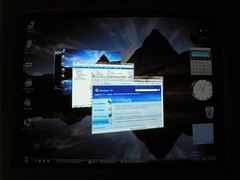
Image by David Reeves via FlickrYour Windows Vista computer's windows Aero features are not being displayed. What is the problem?
You need to make sure you have the correct hardware installed, first and foremost. To improve performance, Windows Vista disables Aero unless it detects appropriate hardware to support it. Make sure your computer has a WDDM-compatible 128 MB graphics card that supports DirectX 9.0 and Pixel Shader 2.0. The minimum requirements are:
- 1 GHz 32-bit (x86) or 64-bit (x64) processor
- 1 GB of random accesss memory (RAM)
- 128 MB graphics card
Troubleshoot-problems-with-Windows-Aero
Related articles
- Aero Tuner, Adds Configuration Options To Windows Aero (ghacks.net)
- Where to Find Windows 7 Aero Themes for Vista (brighthub.com)
- What are the Best Features of Windows Vista? (brighthub.com)
- Fixing Five Common Windows 7 Annoyances (itexpertvoice.com)
- Windows 7 Themes for Windows Vista (devicemag.com)
- Aero Weather, Change Windows Aero Colors Based On Weather [US Only] (ghacks.net)
- 25 Cool Windows 7 Keyboard Tricks That Will Impress Your Friends (makeuseof.com)
- [MINI HOW-TO] Use Aero Snap with Internet Explorer 9 Tabs in Windows 7 (howtogeek.com)
- How to Create 3D Desktops in Windows (crenk.com)
- Windows 7 Management Tools: An Overview (itexpertvoice.com)
Thursday, November 18, 2010
Change the Behavior of the Elevation Prompt in Windows Vista
You are the administrator of your computer and you want to keep the elevation prompt from displaying when you try to make configuration changes. How do you keep the prompt from displaying?
UAC is a new feature for Windows Vista that prevents unauthorized changes and silent installations. The message displays to alert the user and get authorization before continuing with the configuration change. This helps to prevent viruses from making changes to the computer without the user's permission.
- Open Contol Panel
- Open Administrative Tools
- Double click on Local Security Policy
- On the Local Policies Tab, go to Security Options
- Click on User Account Control: Behavior of the elevation prompt for administrators in Admin Approval Mode
- In the drop down box, select Elevate without prompting
- Click ok
Related articles
- Take Screenshots of User Account Control Prompts in Windows 7 (helpdeskgeek.com)
- Can I Disable User Account Control Through The Registry? (lockergnome.com)
- How to Selectively Disable UAC Prompt For Certain Applications (maketecheasier.com)
- Can I Disable User Account Control Through The Registry? (lockergnome.com)
- Group Policies in Windows 7 (itexpertvoice.com)
- Group Policy Registry Key Entries for Windows 7/Vista/XP and Server (mydigitallife.info)
- Am I Secure? Windows Security Center says AVG is Turned Off (brighthub.com)
- Expert's Guide to Windows 7 Security (pcworld.com)
- How to Verify and Check Windows 7 or Vista Activation Status (Retail, KMS or MAK) (mydigitallife.info)
- Run Programs as Administrator with Full Elevated Rights in Windows 7 (helpdeskgeek.com)
Wednesday, November 17, 2010
XML error message for RSS Feed
When trying to view your RSS Feed in Internet Explorer, you receive an error message like this:
What do you do to resolve this?
- Open Internet Explorer
- Click on Internet Options
- Select the Content tab
- Open the Feeds Settings dialog box
- Go to Advanced and check the Turn on Feed Reading View box
This displays the feed in user-friendly content.
Subscribe to:
Posts (Atom)