Monday, October 25, 2010

Laser Printer

cutaway drawing, color illustration of the tec...Image via Wikipedia

Your laser printer repeatedly prints vertical lines through the page.  What is the probable cause?

Answer:  A problem with the corona wires or the drum.  You  probably have some debris caught between the wipe blade and the drum.  


Enhanced by Zemanta

Sunday, October 24, 2010

Dot Matrix Printer


What printer type can print multi-part forms?

Answer:  Dot-matrix.  Multi-part forms, often referred to as carbon copies, have two or more sheets of paper per page. The daisy-wheel printer is higher print quality compared to a dot-matrix printer, but the daisy-wheel printer is limited to printing text and the dot-matrix printer can print text and graphics.

Enhanced by Zemanta

Laser printer prints vertical black line

Color Laser Printer Test Page ResultsImage by Sintas Photography via Flickr

Your laser printer recently began printing a vertical black line near the edge of every printed page.  What should you do to resolve this problem?

Answer:  Replace the toner cartridge.  Toner, the laser equivalent of ink, is a fine powdery mixture of pigment typically made from iron or carbon and an easily melted polymer or wax binder.  When the toner cartridge is almost empty, the laser printer may begin to print a black line on the side of each page.  Another cause of vertical black lines is a scratch on the drum.  The cartridge contains the drum.

Enhanced by Zemanta

Printed sheets are smudged and smeared

Melting toner onto paper using heat and pressu...Image via Wikipedia

You just replaced the toner cartridge in your laser printer and printed sheets are smudged and smeared.  What should you do first to repair this problem?

Answer:  Run a few copies to clear any excess toner.
Enhanced by Zemanta

How to start/stop print spooler service

FS2020 FrontImage via Wikipedia

You are installing a new printer in the network.  When you check the print server properties, it displays the following error:

Server properties cannot be viewed. The print spooler service is not running.

What should you do to resolve the issue?

Answer:  Run the net start spooler command.  This command is used from the command prompt to restart the Printer Spooler service.

Enhanced by Zemanta

Saturday, October 23, 2010

How to use Backup to protect data and restore files and folders

You are trying to use Backup to backup files on your computer.  What must be done to back up the files to disk?

Enhanced by Zemanta

Trouble starting your Windows computer

An internal Zip drive.Image via Wikipedia

After installing a Zip Drive on your computer, you are having problems starting your computer. The computer prompted you to restart after installation, but was unable to restart. What should you do?

Last Know Good Configuration. Allows you to start the operating system using the hardware profile the last time the computer was started successfully.
Enhanced by Zemanta

Friday, October 22, 2010

Internet Zones and pop-ups

Dozens of pop-up ads covering a desktop.Image via Wikipedia

After Service Pack 2, what internet zones allow pop-ups by default?

Trusted sites
Local Intranet sites (Restricted and Internet sites will have pop-ups blocked by default)

Change Internet Explorer Security settings
Enhanced by Zemanta

Audit File Parameters

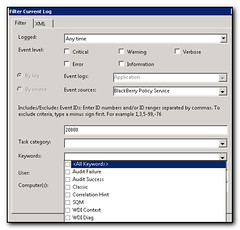
Keywords in event viewerImage by absoblogginlutely via Flickr

You work in a law firm and receive an order to monitor a computer named WORK1. The computer contains shared folders with billing information for all of the company clients. Today all of the files in the folder were deleted. The manager thinks an employee deleted the files in response to a termination. You need to examine the audit log before the employee leaves the company. What filter parameters should you use to examine the audit log to determine if the employee deleted the files?

Answer:  Event id, User, From
Enhanced by Zemanta

Remote Installation Services and PXE

An example block diagram, showing the Microsof...Image via Wikipedia

  1. You work for a help desk and a customer calls you because he needs you to guide him in the process of allowing his users to use RIS (Remote Installation Services) to install Microsoft Windows XP Professional on their computers. The customer wants to test RIS with a new user, first. The user does not currently have an Active Directory Account. The computer the user will use to install the OS currently runs Microsoft Windows 2000 Professional. It has a network interface adapter that is not Pre-boot Execution (PXE-enabled). The customer has already created a PXE boot disk. The customer needs to know if the user will be able to install the operating system.
The user will not be able to install the OS because she does not yet have a domain account.
How To Use Remote Installation Service to Install Windows Server 2003 on Remote Computers
Enhanced by Zemanta

How to prevent opening viral email attachments

microsoft outlook logoImage by adria.richards via Flickr


  1. You introduced several viruses on your pc during the past few months by opening e-mail attachments that you thought were safe.  You want to prevent this problem from happening again. What check box option in Folder Options should you clear to do this?
Hide Extensions for known file types should be unchecked. A file name specified as pics.html.exe will appear as pics.html to make the file appear as an html file when it is really an executable.
Enhanced by Zemanta

Windows XP Themes

Bizarro bugImage by rmkoske via Flickr

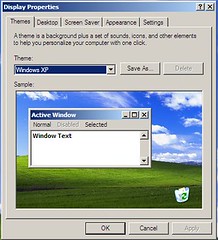
  1. You are having a problem configuring Themes for your new computer, which runs Microsoft Windows XP Home. Fast User Switching is enabled to allow your son to use the computer when you are not using it. You notice the interface on your computer looks different than the one on display at the store. What is the cause of the problem?
The Themes service is disabled or stopped. It must be started to support Windows XP Themes.
Enhanced by Zemanta

Firewall exceptions

Example of firewall function: Blocking spyware...Image via Wikipedia

Mary, travels to customer sites with her Windows XP Pro computer that has Service Pack 2 installed. You have configured the computer, as well as the other company computers, with several Windows Firewall exceptions to enable file sharing and remote management on your internal network. When Mary is in the office, she connects to your internal network using a wired Ethernet connection. When she travels, Mary needs to be able to connect to unprotected wireless networks. You would like to configure Windows Firewall to block all unrequested traffic on her wireless network adapter, but still enable the exceptions for the wired network adapter. What is the process you should use?


Open Windows Firewall settings dialog box. Click the Exceptions tab. Disable all exceptions. Click the Advanced tab. Click Select the wired network adapter, then click Settings. Enable the required exceptions.
Enhanced by Zemanta

Creating Hardware Profiles

Graph of typical Operating System placement on...Image via Wikipedia

  1. Brian is developing device drivers for a new camera his company is manufacturing. Brian's computer runs MS Windows XP Pro. While programming, Brian needs to disable device drivers under development. While testing, Brian needs to enable the devices. He also needs to reboot his computer when switching from programming mode to testing mode. To make life easier, Brian wants to set up an additional hardware profile. The device drivers under development are currently enabled. What are the steps to create a new hardware profile?
Create a copy of the current hardware profile
Restart the computer.
Select the new hardware profile.
Disable the devices.
Enhanced by Zemanta

Security and Local Policy Settings in Windows XP

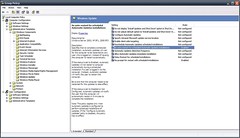
group policyImage by Chris Trillana via Flickr

You are having problems sharing your DVD-ROM drive. You work at a small office and have Windows XP Pro computers. Whenever one of your co-workers try to access the share, they receive an "access denied" message. You verify the DVD-ROM is shared, and the appropriate permissions are granted. What should you do to enable your DVD-ROM drive to be shared by your co-workers?