Tuesday, January 4, 2011

Folder Redirection

This is a diagram of a server-based computer n...Image via Wikipedia


  1. A manager would like to have user folders (like My Documents and My Pictures) automatically backed up by network administrators. What does this manager need?
Folder Redirection allows user data to be backed up to an alternate location, like a network server, normally using group policy.

http://technet.microsoft.com/en-us/library/cc778976(WS.10).aspx

Enhanced by Zemanta

How can you print a printer self test page?


How can you print a printer self test page?


Answer: Through the operator panel on the printer, or, through the printer properties settings.

Related articles
Enhanced by Zemanta

Monday, January 3, 2011

How to remove an external USB hard drive

What is the BEST way to explain to a user how to move an external USB hard drive to another computer?

Dismount the drive by right-clicking the device icon in the system tray. When the system displays that it is safe to remove the drive, unplug the device from the computer and plug it into the other computer.
Enhanced by Zemanta

Sunday, January 2, 2011

Hibernation

Laptop computers are portable and can be used ...Image via Wikipedia

You need to configure your desktop computer to maximize the time between recharging your computer that is used infrequently during the day. What mode should you use?


Hibernation is a feature of laptops that allow them to enter into a low power state. This low power state will ensure that the laptop battery is not consumed when it is sitting idle. Hibernation can be configured through the Power Options applet in the Control Panel.

Related articles
Enhanced by Zemanta

Thursday, December 23, 2010

How to create address labels using Open Office Mail Merge

OpenOffice.org Calc 3.0.0 on Ubuntu 8.10Image via Wikipedia


First, go to Open Office and download your free productivity suite.

In the past, I addressed all my Christmas labels by hand.  What a pain.  After spending way too much time on doing THAT this year, I finally figured out how to do a Mail Merge to create address labels using Open Office.  The reason for using Open Office is, it is free, as I do not have Microsoft Office on my laptop and I hate to pay for something I can get free.  If you are used to Microsoft Office Mail Merge, you might have some difficulty, but follow my instructions for using Open Office, as I have condensed the instructions into an easy to understand format, I hope.

If you have any confusion, use the Open Office docu Using Mail Merge to follow along with my instructions.  Both documents together might clear up any questions you have.  After you have downloaded Open Office and saved it to your desktop:

Tuesday, November 30, 2010

Display Gadget on Windows Sidebar


You need to display a clock on your desktop so you can always see the current time at all times. 

  • Open Windows Sidebar
  • Add the Clock gadget to Windows Sidebar
  • Open Windows Sidebar Properties
  • Select the Start Sidebar when Windows starts option.
Gadgets are mini programs that run on your desktop that you can interact with.  You can add gadgets by starting Windows Sidebar and clicking the Add (+) button.  Double-clicking the Clock gadget will add it to Windows Sidebar.  To configure Windows Sidebar to start when Windows starts, right-click Windows Sidebar and choose Properties.  Then select the Start Sidebar when Windows starts option to allow the Clock gadget to be visible when Kari starts her computer. 

Customize-Windows-Sidebar
Enhanced by Zemanta

Tuesday, November 23, 2010

Set up network connection in a hotel

"Black-white 2 Vista" icon themeImage via Wikipedia

Your hotel has a wireless connection and you have a laptop with Windows Vista Business.  Your laptop already has a connection for another wireless network.  This connection allows your co-workers to access documents in the Public folder, located at C:\\Users\Public folder.  Your co-workers need to access these documents without providing authorization.  You need to connect to the hotel's wireless network without worrying about whether other hotel customers can access the documents.

You need to configure your laptop to allow you to switch between the networks seamlessly.

Change the hotel's wireless network to Public.  Turn off password protection.  Turn on network discovery.
Changing the hotel's wireless network to Public disables network discovery by default.  This prevents other hotel customers from viewing your computer.  Public does not mean your documents are public.  It means you are in a public place. Turning off password protection and turning on network discovery allows your co-workers to access the documents located on your laptop without providing authorization.

Troubleshoot-network-connection-problems
Enhanced by Zemanta

Monday, November 22, 2010

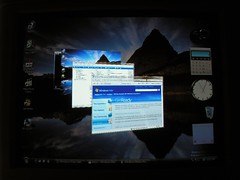
Windows Aero features not displayed in Windows Vista

When you finally get it installed it looks pretty.Image by David Reeves via Flickr

Your Windows Vista computer's windows Aero features are not being displayed.  What is the problem?

You need to make sure you have the correct hardware installed, first and foremost.  To improve performance, Windows Vista disables Aero unless it detects appropriate hardware to support it.  Make sure your computer has a WDDM-compatible 128 MB graphics card that supports DirectX 9.0 and Pixel Shader 2.0.  The minimum requirements are:

  • 1 GHz 32-bit (x86) or 64-bit (x64) processor
  • 1 GB of random accesss memory (RAM)
  • 128 MB graphics card
For optimal results, you should make sure the color is set to 32 bit, the the monitor refresh rate is higher than 10 hertz (Hz), the theme is set to Windows Vista, the color scheme is set to Windows Aero‌, and window frame transparency is on.

Troubleshoot-problems-with-Windows-Aero


Enhanced by Zemanta

Thursday, November 18, 2010

Change the Behavior of the Elevation Prompt in Windows Vista


You are the administrator of your computer and you want to keep the elevation prompt from displaying when you try to make configuration changes.   How do you keep the prompt from displaying?

UAC is a new feature for Windows Vista that prevents unauthorized changes and silent installations.  The message displays to alert the user and get authorization before continuing with the configuration change.  This helps to prevent viruses from making changes to the computer without the user's permission. 

  • Open Contol Panel
  • Open Administrative Tools
  • Double click on Local Security Policy
  • On the Local Policies Tab, go to Security Options
  • Click on User Account Control:  Behavior of the elevation prompt for administrators in Admin Approval Mode
  • In the drop down box, select Elevate without prompting
  • Click ok
Getting Started with User Account Control on Windows Vista
Enhanced by Zemanta

Wednesday, November 17, 2010

XML error message for RSS Feed

This icon, known as the "feed icon" ...Image via Wikipedia

When trying to view your RSS Feed in Internet Explorer, you receive an error message like this:


What do you do to resolve this?

  1. Open Internet Explorer
  2. Click on Internet Options
  3. Select the Content tab
  4. Open the Feeds Settings dialog box
  5. Go to Advanced and check the Turn on Feed Reading View box

This displays the feed in user-friendly content.
Enhanced by Zemanta

Prevent Tracking in Internet Explorer


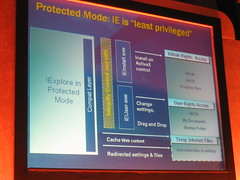
Internet Explorer 7 with Windows Vista runs in Protected Mode which prevents Component Object Model (COM) objects such as ActiveX controls, from modifying files and settings on your computer, thus making surfing the Web much safer.  Protected Mode is enabled by default in IE7. 

To turn off Protected Mode, though it is not advisable, go to Internet Options, select the Security Tab, then select the Enable Protected Mode option.


Another way to manipulate the Protected Mode option, is to put your cursor over the Protected Mode text at the bottom of your Internet Explorer browser window and double click.


Enhanced by Zemanta

Tuesday, November 16, 2010

Working Offline in Windows Vista


You are leaving town to attend a business meeting tomorrow.  You will not have access to the network, but need to access some files in your folder at work while you are at the business meeting.


How do you configure Windows Vista to enable you to access the file in your work folder?


You do this by utilizing the Offline Files feature of Windows Vista.  Vista copies the network folders and files and places them on your computer.  When you are offline, Vista uses the local folders and syncs them with the network when you reconnect.

  • Go to Control Panel and select Offline Files - Classic View.
  • Enable Offline Files.
  • Restart your computer.
  • Open Windows Explorer (Windows button + E key) and navigate to the network file folder you are interested in.
  • Right click the folder and select Always Available Offline.
(If your internet connection is down or slow, you might want to work with the offline files stored on your computer instead of the network.  To do this, open the network file that you have made available offline, and on the Toolbar, click Work Offline.  When you are finished, click Work Online to sync and make the file available on the network again.)

Working with network files when you are offline
Enhanced by Zemanta

Monday, November 15, 2010

Send and Receive Faxes

Windows Vista is one of Microsoft's latest cli...Image via Wikipedia

Below is the Microsoft link detailing the Windows Vista Fax and Scan Wizard.  If you are using a fax server, make sure you know the network address of the fax server, for example file://companyfaxserver/, and are connected to the Network.  If you are using a fax modem, make sure you have an analog phone line attached to your computer.  A digital phone will not work.  If you have an internal fax modem, Windows will detect it during setup.  If you have an external modem, connect it to the computer and turn it on before running the wizard.

Open Windows Fax and Scan
At the bottom of the left pane, choose Fax
Choose Fax Accounts from the Tools Menu
Follow the Wizard to set up a fax server or a fax modem

Set up your computer to send and receive faxes
Enhanced by Zemanta

File and Printer Sharing in Windows Vista

Windows Vista is one of Microsoft's latest cli...Image via Wikipedia


You would like to set up a Windows Vista computer in your home office to host file and printer sharing. 
You need to do this while maintaining your security.

Go to the Network and Sharing Center and make sure file sharing and printer sharing is turned on.  Configure a share name for the Folder on the Sharing tab in the Folder's Properties Dialog box.  Configure Permissions in the Security tab of the Properties Dialog box.  Permissions are required to make the folder available over the network and identify who has access and what their rights are.  See the Microsoft link below to find out other ways to share files.

File Sharing Essentials
Enhanced by Zemanta